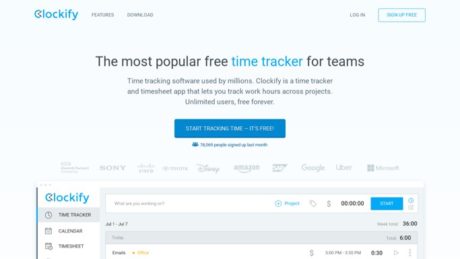
Clockify

Time tracking software used by millions. A simple time tracker and timesheet app that lets you track work hours across projects.
Matej Kukucka
Matej Kukucka
Value
Cost
Score

Clockify Review: Free Time Tracking That Works?

About

Clockify is a widely adopted time tracking and timesheet software, designed to help individuals and teams monitor work hours, improve productivity, and manage billable activities across projects. With an accessible “free forever” plan, robust cross-platform support, and a focus on usability, Clockify stands out as a leading choice for freelancers, agencies, businesses, and organizations of all sizes looking to streamline their time-tracking and reporting processes.

Summary

Clockify is a user-friendly time tracking solution that empowers users to log time, manage projects, and analyze productivity through detailed reports. Its intuitive design, combined with a generous free plan offering unlimited users and projects, makes it especially attractive to startups, nonprofits, and budget-conscious organizations. The software’s standout features include real-time timers, manual timesheets, cross-platform synchronization (web, desktop, mobile), and integrations with popular tools like Google Calendar, Slack, and Trello. Clockify excels in core time-tracking tasks, providing a highly accessible entry point for teams looking for efficient work hour management without heavy administrative setup.
Top reasons to choose Clockify:

  • Truly free plan for unlimited users and projects
  • Simple, clear interface with minimal learning curve
  • Comprehensive reporting and analytics
  • Multi-device support (web, desktop, mobile)
  • Scalable with paid plans offering advanced features (e.g., invoicing, scheduling, GPS/location, and compliance tools)

Primary Features

  • Time Tracking: Start/stop timer, manual time entries, weekly timesheets, and calendar views
  • Project & Task Management: Organize time by projects, clients, and tasks; set hourly rates and budgets; assign team members
  • Reporting: Generate detailed reports on time usage, billable hours, project progress, and team productivity; export to PDF, CSV, Excel
  • Integrations: Connect with tools like Asana, Trello, Jira, Google Calendar, Slack, Zapier, and more
  • Cross-Platform Support: Available via web browser, desktop apps (Windows, Mac, Linux), mobile apps (iOS, Android), and browser extensions
  • Reminders & Idle Detection: Desktop/browser reminders to start/stop tracking; idle detection to avoid logging inactivity
  • Team Management: Invite unlimited team members, manage access, monitor activity, and approve timesheets (advanced features in paid plans)
  • Kiosk Mode: PIN-based group clock-ins for shared devices (ideal for on-site staff, available in paid plans)
  • Offline Mode: Time can be logged offline on mobile/desktop, syncing when reconnected
  • Advanced Features (with paid plans): GPS tracking, screenshot monitoring, scheduling, expense tracking, time-off management, invoicing, and more

Target Audience

  • Freelancers & Consultants: Individuals needing to track billable/non-billable hours and generate accurate invoices
  • Agencies & Professional Services: Firms managing multiple client projects, requiring detailed time allocation and reporting
  • Small & Medium Businesses: Teams seeking affordable, scalable time tracking and productivity insights
  • Remote & Hybrid Teams: Organizations managing distributed workforces who need transparent, flexible time management
  • Nonprofits & Startups: Groups needing robust tools without high costs, benefitting from the “forever free” tier
  • Enterprise Teams: Larger organizations that require advanced features and integrations (with paid plans)

Use Cases

  • Client Billing: Track project hours for accurate, defensible invoices
  • Payroll Support: Provide detailed time reports to streamline payroll processing
  • Productivity Analysis: Identify time sinks, bottlenecks, and opportunities for workflow optimization
  • Project Budgeting: Monitor project progress and costs in real-time, ensuring adherence to budgets
  • Team Management: Approve timesheets, monitor remote and field staff, and ensure accountability
  • Compliance & Auditing: Maintain robust, auditable time logs for regulatory or client contract requirements
  • On-Site Attendance: Use Kiosk Mode for group clock-ins/out at physical locations

Pros of Clockify

  • “Forever free” plan with unlimited users, projects, and time entries
  • Easy to set up, intuitive interface with minimal training required
  • Flexible time tracking: timers, manual entries, timesheets, calendar view
  • Strong reporting and export tools for analysis and billing
  • Wide range of integrations with third-party tools
  • Cross-platform and offline functionality
  • Scalable for teams of any size
  • Transparent, affordable paid tiers for advanced needs

Cons of Clockify

  • Some advanced features (invoicing, GPS, scheduling, approvals) require paid plans
  • Mobile app can be less stable and limited compared to desktop/web
  • User interface, while simple, may feel dated to some users
  • Limited in-built project management beyond time tracking
  • Manual approval workflows and advanced permissions only in higher-tier plans
  • No integrated payroll processing (unlike some workforce management platforms)

Why Choose the software?

Clockify is an ideal solution for organizations and individuals seeking a reliable, no-frills time tracking tool with a rare combination of a generous free tier and robust feature set. Its simple interface and cross-platform support make it easy for teams to adopt, while advanced reporting, export options, and integrations ensure it fits well into diverse workflows.
Choose Clockify if you want:

  • A cost-effective way to track time for unlimited users and projects
  • A simple, accessible tool with a proven track record and millions of users
  • Scalability, from solo freelancers to large teams
  • Core time tracking with the option to unlock advanced features as your needs grow
  • Flexible deployment across devices and operating systems

Clockify’s transparent pricing, ease of use, and reputation for reliability make it a top contender for anyone looking to implement or upgrade time tracking in their organization.

Features

Reporting

Clockify offers a robust set of reporting capabilities designed to help businesses analyze productivity, attendance, profitability, and project progress. Reports are available in multiple formats including summary, detailed, weekly, assignments, attendance, and expense reports. The Summary report provides an overview of time tracked by user, project, or client, while the Detailed report lists individual time entries with descriptions and tags. Weekly reports allow managers to review how time is distributed across days and projects. Assignment and Attendance reports help monitor team allocations and presence, and the Expense report tracks costs and reimbursements. Key metrics tracked include billable hours, costs, earnings, time per user or project, and overall team performance. Filters enable users to drill down by employee, project, client, or tag. Reports can be shared via live links or exported to PDF, CSV, or Excel formats, supporting business use cases such as client billing, payroll, performance reviews, and project tracking.

Integrations

Clockify integrates with over 80 popular web applications, enhancing workflow efficiency by allowing time tracking directly within third-party tools. Key integrations include project management platforms such as Jira, Asana, Trello, Plaky, Todoist, Basecamp, Gitlab, Github, Azure DevOps, YouTrack, ClickUp, Wrike, Monday, Teamwork, and Help Scout. Productivity and office tool integrations are available for QuickBooks, Google Calendar, Outlook, Google Docs, Google Sheets, Notion, Gmail, Airtable, Zendesk, Hubspot, and Freshdesk, among others. By installing the Clockify browser extension, users can start timers from within these apps, seamlessly linking time entries to tasks, issues, or events. This streamlines project tracking, ensures accurate client billing, and unifies time data across disparate workflows, providing businesses with a comprehensive view of work performed regardless of tool or platform.

Mobile Apps

Clockify provides dedicated mobile applications for both iOS and Android platforms. The mobile apps enable users to track time on the go, either by starting/stopping a timer or entering hours manually. Features include location tracking (if enabled), offline time tracking (with sync on reconnect), and access to the same core functionalities as the desktop and web versions, such as project and task selection, expense tracking, and approvals. The mobile apps are especially useful for remote teams, field workers, and businesses needing to capture work hours outside of the office. Additional features like GPS route review and privacy controls ensure that organizations can monitor on-site work while respecting user privacy.

Single Sign-On (SSO)

Clockify supports Single Sign-On (SSO) for enterprise-grade security and convenience, available via SAML 2.0 and OAuth 2.0 (OIDC). Supported identity providers include Office 365, Okta, Azure Active Directory, Google, OneLogin, Rippling, and JumpCloud. SSO is available on the Enterprise plan and requires moving the workspace to a dedicated subdomain. This setup centralizes access control, lets organizations disable other login methods, and allows users to authenticate using their corporate identities. API keys are tied to the subdomain for added data isolation. SSO can be used on both web and mobile platforms, providing secure, streamlined access and reducing password fatigue and administrative overhead.

Automation

Clockify features several automation capabilities aimed at optimizing time and task management. The Auto Tracker automatically records time spent on apps, websites, and documents, offering a timeline overview and identifying productivity gaps. Users can convert logged activities into time entries. Idle detection is available as an optional feature, prompting users to discard or keep idle time, and reminders can be set to ensure timesheets are submitted on schedule. Through the public API, businesses can automate time tracking, approvals, user and workspace management, project and client creation, and time-off policies. These automation features help reduce manual entry, minimize errors, and ensure timely, accurate data for reporting and payroll.

Security

Clockify employs a multi-layered approach to data protection and privacy. All data is securely hosted on Amazon Web Services (AWS) and connections are encrypted using 256-bit SSL encryption, matching online banking standards. Users have full control over data input, and sensitive features like screenshots and location tracking are only enabled with user consent and explicit admin activation. Data is only collected as provided by users, with optional use of cookies for login sessions and anonymized analytics. Clockify offers regional data hosting (USA, EU, UK, AU) to support compliance with local data handling laws. The platform adheres to GDPR requirements for data privacy. While infrastructure backups are performed regularly, Clockify recommends that users export personal backups for additional safety. Account and data deletion capabilities are available to users at any time.

API

Clockify provides a comprehensive public API that enables deep integration and customization for advanced workflows. The API allows for time tracking automation (start, stop, edit entries), user and workspace management (add, update, assign users, manage roles and custom fields), client and project management (CRUD operations), time-off management (holidays, policies, approvals), and detailed reporting/export of time data. API actions follow the same permissions model as the web app, ensuring data security and access control. The API is suitable for integrating Clockify with CRMs, project management tools, payroll systems, and custom internal solutions, supporting both real-time and scheduled interactions. Extensive documentation is available for developers, but custom integration services are not provided by Clockify.

Deployment

Clockify is a cloud-based solution, with all data hosted on AWS in a region selected by the user (USA, EU, UK, AU). There is no on-premises deployment option available. The cloud model offers advantages such as automatic updates, high availability, global accessibility, and managed security. However, organizations with strict data residency or in-house infrastructure requirements may find the lack of an on-premises option limiting. Data hosting regions can be chosen during workspace creation to meet performance and compliance needs.

Videos

Clockify Video Tutorials and Product Overviews

1. Clockify Tutorial for Beginners (2023) – How to Use Clockify for Time Tracking

This video provides a step-by-step beginner’s guide on how to use Clockify for time tracking. It covers setting up a free account, creating projects, tracking time with timers and manual entries, generating reports, and using Clockify’s dashboard. The tutorial is ideal for individuals and teams looking to improve productivity and manage work hours efficiently.

2. How To Use Clockify for Time Tracking (Full Tutorial)

This comprehensive tutorial demonstrates how to use Clockify’s features including project setup, inviting team members, tracking billable and non-billable hours, and analyzing reports for payroll or productivity purposes. The video also explains integration options and best practices for maximizing Clockify’s potential in both small and large teams.

Resources

Training

Clockify offers a selection of training resources primarily through its Learn and Resources sections. Users can find detailed guides and articles designed to help new users get started and more experienced users deepen their understanding. These guides cover core functionalities, best practices for different industries, and tips for optimizing workflows. Topics range from account setup and project management to specific use cases like team timesheet management and compliance. At the time of this writing, there is no evidence of regularly scheduled webinars or formal online courses provided directly by Clockify. Training is self-paced, with users relying on written guides and tutorials for onboarding and advanced use.

Wiki/Docs

Clockify maintains a documentation site focused on API usage and technical integrations. While there is a segment dedicated to technical documentation, there is no centralized wiki or comprehensive manual covering all aspects of the software for general users. Most user-facing information is found in the Learn section or through help articles and FAQs. The documentation is structured for self-service and is segmented by topic rather than being a continuous or community-edited wiki. As such, users looking for deep technical references, especially relating to integrations, will benefit most from the available API docs.

Community

There is no active, official Clockify community such as a user forum, discussion board, or online group where users can interact, share experiences, or ask questions. Official resources and knowledge sharing are provided exclusively by Clockify’s team through their own platform, with no community-driven platforms or support options available. Users seeking peer-to-peer support will not find an official Clockify forum or group.

Support

Clockify offers support through several official channels. Users can contact the team via email (support@clockify.me), use the live chat function available on the website, or call the support line at +1-855-738-8741. There are also options to schedule a product demo or reach out to the sales team for specific inquiries. While the website does not specify guaranteed response times or detailed support hours, the availability of chat and phone support suggests a focus on timely responses. For self-service support, Clockify provides a Help section with popular troubleshooting topics, tutorials, and a changelog.

No hyperlinks are included, as there are none related to Clockify resources available from https://marketingplayer.com/ per the given instructions. All information is accurate to the best of current knowledge and reflects the resources available directly from Clockify.

Pricing

Clockify Pricing Plans Overview

Clockify offers a range of pricing plans designed to fit individuals, small teams, and organizations of all sizes. All users can start with a fully functional free plan, and paid plans add more advanced features. Pricing is based on the number of users and can be paid monthly or annually, with a discount for annual payment. Below is a comprehensive overview of each plan, including features and options for trials and demos.

Clockify Pricing Table

Plan Name Price (Annual/Monthly) Features Free Trial Lifetime Purchase
Free $0 (Unlimited users) Unlimited time tracking, unlimited users, unlimited projects, basic reporting, kiosk mode, multiple currencies, integration with apps (except QuickBooks), API access, and support. Not required (plan is always free) Not available
Basic $3.99/$4.99 per user/month (annually/monthly) All Free features plus: add time for others, hide time and pages, required fields, bulk edit, decimal format, time audit, customize reports, project templates, historic rates, edit profiles, import timesheets, PIN, breaks on kiosk and web app. Included in 7-day free trial Not available
Standard $5.49/$6.99 per user/month (annually/monthly) All Basic features plus: time off, invoicing, time approval, lock timesheets, targets & reminders, manager role, task rates, time rounding, QuickBooks integration, customize kiosk, attendance & overtime. Included in 7-day free trial Not available
Pro $7.99/$9.99 per user/month (annually/monthly) All Standard features plus: scheduling, expenses, labor cost and profit, budget and estimates, custom fields, user fields, email reports, assignment report, alerts, force timer, GPS tracking, screenshots, forecasting, data regions, assign currency to client. Included in 7-day free trial Not available
Enterprise $11.99/$14.99 per user/month (annually/monthly) All Pro features plus: single sign-on (SSO), custom subdomain, control accounts, audit log. Included in 7-day free trial Not available
CAKE.com Bundle $12.99/$15.99 per user/month (annually/monthly) All Enterprise features plus: full access to Pumble (team communication) and Plaky (project management). Included in 7-day free trial Not available

Free Trial

Clockify provides a 7-day free trial that unlocks all paid features. No credit card is required to activate this trial. Only a workspace owner or admin can enable the trial. To begin, sign in to your Clockify account, click the “Upgrade” button, and select “Start Trial.” The free trial is only available once per workspace and cannot be activated again if already used or if the workspace was previously upgraded. After the trial ends, the workspace automatically reverts to the free version, with all premium features disabled, but data created during the trial remains accessible. If additional time is needed to test features, users can contact Clockify support for a possible extension.

During the free trial, users have access to every advanced feature found in the Basic, Standard, Pro, Enterprise, and CAKE.com Bundle plans. This includes project scheduling, invoicing, time off management, approval workflows, advanced reporting, GPS tracking, screenshots, SSO, and other enterprise-grade controls.

To sign up for the free trial, go to the Clockify Free Trial page or activate it within the Clockify app after registering an account.

Demo Availability

Clockify offers live demos by request, which can be scheduled via the Contact Sales page. A product specialist guides users through the main features, account setup, common use cases, workflow customization, and answers any specific questions. The demo is tailored to the audience, whether it’s for individuals, teams, or enterprise organizations. For self-serve learning, Clockify provides numerous video tutorials and product walkthroughs on its YouTube channel.

YouTube Demo Videos

Clockify’s official YouTube channel hosts a variety of demo and tutorial videos. These videos visually demonstrate how to use core features, set up your workspace, track time, generate reports, and manage teams. Notable demo videos include:

Time Tracker | Clockify Tutorial (2024)
Clockify Tour
Clockify Official YouTube Channel

Lifetime License Option

At this time, Clockify does not offer a lifetime or one-time purchase option. All paid plans are available only as monthly or annual subscriptions per user.

Reviews

Review Insights

Clockify receives consistently high marks across major software review portals, praised for its straightforward time tracking, flexible free plan, and detailed reporting features. According to Capterra, Clockify holds an overall rating of 4.8 out of 5, based on more than 9,000 reviews. Users frequently cite the software’s ease of use, value for money (particularly the robust free plan), and clear, customizable reports as standout positives. Several reviewers appreciate unlimited users and projects at no additional cost. Key review themes include:

  • Ease of Use: Users find Clockify intuitive for tracking both billable and non-billable hours, with a simple interface suitable for individuals and teams.
  • Reporting: The reporting features allow for detailed exports to PDF or Excel and are highlighted as a significant benefit, even on the free plan.
  • Affordability and Value: Many users cite the free plan as meeting all their basic needs, with paid tiers providing additional management and reporting tools.
  • Mobile and Browser Flexibility: The mobile app and browser extension are both well-rated for convenience.
  • Occasional Drawbacks: Some negative feedback notes sluggishness, a somewhat dated or clunky interface, and limited integration with payroll solutions.

A detailed expert review on Connecteam (read here) gives Clockify a score of 7.2/10, recognizing its robust free offering and reporting, but noting its limitations in project management, scheduling, and lack of payroll integration.

For more user review insights and direct feedback, see:

Customers

Clockify is used by a diverse range of organizations worldwide, including large enterprises and small businesses. Some notable companies publicly listed as users include:

Additionally, Clockify features customer stories from creative and professional firms, such as:

  • Riotters (Case Study) – A digital agency that uses Clockify to streamline project time tracking and improve transparency for both team members and clients.
  • NMCO Studio (Case Study) – Uses Clockify to coordinate creative projects and manage billable hours across multiple clients.
  • XayLi Barclay (Case Study) – A business coach and content creator who leverages Clockify for tracking her consulting and content production time.

More customer examples and real-world usage stories are available on the Clockify Customer Stories page. While some large organizations are listed as users, most detailed use cases are from small businesses and individual professionals.

Clockify Alternatives

There are several reputable alternatives to Clockify, each with distinct features, pricing, and target audiences:

  • Toggl Track (Official Site): Recognized for its intuitive interface and ease of use, Toggl Track offers free time tracking for up to 5 users, with paid plans starting at $9 per user/month (as of 2024). It supports simple project and client management, detailed reporting, and broad integrations. Toggl Track is popular among freelancers, agencies, and small-to-medium teams seeking a fast learning curve and minimal setup.
  • Harvest (Official Site): Harvest combines time tracking with powerful invoicing and expense management features, filling a gap in Clockify’s offering. Pricing starts at $12 per user/month. Harvest integrates with project management tools and is suited to teams that need built-in invoicing, expense tracking, and reporting.
  • RescueTime (Official Site): Focused on productivity optimization, RescueTime automatically tracks time spent on websites and applications, provides distraction blocking, and offers productivity coaching. Plans start at around $12 per month. Ideal for individuals and remote workers who want to improve focus and understand their digital habits.
  • EARLY (Official Site): EARLY distinguishes itself with multiple time-tracking methods (automatic tracking, AI-powered suggestions, and even a physical tracking gadget). It emphasizes privacy (no screenshots), and is used by companies like Google and McKinsey. It’s best for teams prioritizing privacy, accuracy, and a modern interface.
  • DeskTime (Official Site): DeskTime offers automatic time tracking, app and website monitoring, and productivity analysis, with plans starting from $7 per user/month. It is suitable for companies needing background tracking and detailed productivity statistics.

For a broader comparison, see:

YouTube Demo Videos

For hands-on demonstrations and walkthroughs of Clockify’s features and interface, see the following demo videos:

Conclusion

Clockify stands out as a practical time-tracking solution that offers a mix of robust features and approachable pricing, making it particularly appealing for businesses and teams needing straightforward time management. One of its strongest selling points is the free plan, which supports unlimited users and offers core time-tracking and reporting capabilities—an attractive starter option for startups or small teams. The interface is generally simple and intuitive for basic time logging, and the reporting tools are comprehensive and customizable, allowing managers to generate detailed insights across projects and time periods.

Additional strengths include mobile and desktop access, integrations with a range of project management apps, and features like GPS tracking, screenshots, and kiosk mode as you move up to higher-tier plans. However, Clockify is not without its weaknesses. The interface, while functional, is frequently described as somewhat dated and less polished than modern competitors, which can lead to a clunky user experience, especially for managers overseeing complex teams or workflows. Project, task, and shift management tools are present but limited, with users often noting that advanced scheduling, expense tracking, and forecasting are only available on more expensive plans. Integration with payroll platforms is notably absent, meaning manual processes are required for payroll administration, which adds extra steps for organizations needing seamless end-to-end solutions.

Pricing is competitive: the free plan is generous, while paid plans start at $2.99 per user per month (Basic), with Pro ($7.99/user/mo) and Enterprise ($11.99/user/mo) unlocking additional features like advanced scheduling, expense tracking, GPS, and user roles. Usability is generally good for basic needs, but the onboarding process is minimal, and some users report occasional syncing issues with third-party integrations on mobile. In terms of alternatives, Clockify faces competition from tools like Toggl Track, Harvest, and Workyard, which may offer more modern interfaces, deeper project management, or built-in payroll integrations, albeit often at a higher price point.

Overall, Clockify delivers reliable time tracking and reporting at a reasonable price, but its dated interface and feature limitations mean it may not be the best fit for organizations seeking an all-in-one workforce management platform. Based on the latest reviews and a critical assessment of its strengths and weaknesses, Clockify earns a solid 7.2 out of 10. This score reflects its excellent value on the free plan, ease of basic use, and strong reporting, while acknowledging the trade-offs in user experience, advanced management features, and payroll integration. For teams with straightforward time-tracking needs who value affordability and flexibility, Clockify remains a competent, dependable choice; for those requiring deeper project management or seamless payroll workflows, exploring the alternatives may yield better results.

FAQs

What are the main features of Clockify?

Clockify offers a wide range of features to help individuals and teams track time and manage productivity. Its core functionalities include time tracking via timer, manual entry, or timesheet, project and task management, expense tracking, and reporting tools. You can analyze, filter, share, and export reports to understand where time goes. Advanced features available in paid plans include invoicing, time off management, timesheet approvals, attendance and overtime tracking, targets and reminders, manager roles, task-based rates, time rounding, and integrations such as QuickBooks for payroll and billing. Clockify is available as a web app and through dedicated apps for Windows, Mac, iOS, Android, and browser extensions.

How much does Clockify cost?

Clockify has a free plan that allows unlimited users and time tracking with no time limit. Paid plans start at $5.49 USD per seat per month (billed annually) or $6.99 per seat per month (billed monthly) for the Standard plan, which includes features such as timesheet approvals, invoicing, time off tracking, attendance and overtime, and more. Higher-tier plans (Pro and Enterprise) offer additional features like advanced reporting, security, and privacy options. All prices are shown without taxes, and VAT may be added depending on your location. You can try all paid features free for 7 days with no credit card required.

What integrations does Clockify support?

Clockify offers integrations with a variety of popular platforms and tools to enhance workflow and productivity. Some notable integrations include QuickBooks for payroll and billing, as well as connections with project management, collaboration, and productivity apps via browser extensions and API access. For an up-to-date and comprehensive list of integrations, you can refer to Clockify’s Integrations Help page. Integrations can usually be set up directly from the app or via browser extensions for Chrome and Firefox.

How do I get support for Clockify?

Clockify provides support to all users, including those on the free plan. You can access tutorials, guides, troubleshooting tips, and FAQs through the Clockify Help Center. There are also options to contact the support team directly or book a demo for onboarding and more complex questions. Premium users may have access to prioritized support depending on their plan. For billing and sales inquiries, you can contact the sales team directly via the website.

How is Clockify deployed? Can I use it on multiple devices?

Clockify is a cloud-based software, meaning it is primarily accessed via a web browser. In addition, dedicated apps are available for Windows, Mac, Linux, iOS, and Android. There are also browser extensions for Chrome and Firefox, and a desktop widget for quick time tracking. All data is synced across devices in real-time, so you can switch between desktop, mobile, and web seamlessly. No self-hosted or on-premises deployment options are listed; all user data is managed securely in the cloud by Clockify.

Are there any limits in the free plan?

The free plan allows you to track unlimited time and invite as many users as you need, for as long as you want. There are no user or tracking limits on the free version. Support is available to all users. If you require additional features such as invoicing, timesheet approvals, or advanced reporting, you can upgrade at any time.

Can I try out paid features before purchasing?

Yes, you can try out all paid features for free for 7 days with no credit card required. You simply need to activate the free trial from the Upgrade page in your Clockify account. If you need more time to evaluate, you can contact the sales team for an extension or request a demo.

What is a seat in Clockify’s pricing?

A seat refers to an active or invited user in a paid plan. Each user who is active or invited to your workspace requires a paid seat. If you deactivate a user, you free up that paid seat for someone else. Adding additional seats mid-billing cycle will result in a prorated charge for that cycle.

Are there any additional taxes or fees?

All prices listed by Clockify are exclusive of taxes. VAT or other taxes may be added at checkout if required by your country’s regulations. The final price, including any applicable taxes, is displayed before payment.

How do I cancel my subscription?

You can cancel your Clockify subscription at any time through the Subscription page under the Billing tab. After cancellation, you will be downgraded to the free version once the current subscription period ends, and no further charges will apply. All your data remains intact; only access to paid features is affected.

What payment methods are accepted?

Clockify accepts payments by credit card for all plans. For larger purchases, such as annual multi-seat licenses, wire transfers and purchase orders are also supported. For these alternative payment methods, it’s recommended to contact the sales team directly.

Does Clockify offer refunds?

There is no explicit information available regarding refunds on the official Clockify site. For questions about refunds, it is recommended to contact their support or sales team directly.

Is there a way to get onboarding help?

Yes, when you upgrade to a paid plan, Clockify offers a free 30-minute tailored onboarding session to help you get started and set up your workspace efficiently. You can also book a demo or access detailed tutorials and guides through the Help Center.

How secure is my data with Clockify?

Clockify is managed as a cloud service and employs industry-standard security practices to protect user data. For more detailed information about data security and privacy, you should refer to the official Clockify documentation or contact their support directly. No specific details about compliance certifications are listed in the currently available information.

Matej Kukucka
Lector Matej Kukucka
Matej Kukucka is the CMO at Luigi’s Box, leading a team building top e-commerce tools. He also founded Marketing Player to help marketers grow in strategy and performance. With 10+ years in B2B SaaS, he shares valuable insights, practical tactics, and key lessons from scaling tech companies.
Comments (0) Add a comment
Add a comment

Your email address will not be published. Required fields are marked *.